Breaking News
Loading...
  • New Movies
  • Recent Games
  • Tech Review

Recent Post

Tampilkan postingan dengan label Symbian. Tampilkan semua postingan
Senin, 11 April 2011
Nokia E7 preview

Nokia E7 preview

Well here it is, the Nokia E7 - Nokia's newest Eseries flagship (soon to be dethroned by the Nokia E6) and the hire apparent to the Communicator series. In regards to Nokia's naming scheme, my views of the E7's naming scheme haven't changed since Nokia World 2010 when it was first officially unveiled and where I had my first hands-on.

The built quality is brilliant. I can find absolutely no faults with the hardware design and the materials used. It feels solid. The slider feels great and I found the AMOLED screen with Clear Black Display to be stunning. But I can't help thinking what I am seeing here as what was a Nseries smartphone rebadged as an Eseries because Nokia either could not get another Eseries out in time or felt that marketing this as a Nseries phone would remind people of the much hated Nokia N97.

The specs are typical Symbian^3 specs in that it runs on a ARM11 680 MHz processor, which isn't a big deal considering how optimised the OS is with in taking advantage of the GPU. The 256MB of RAM does seem lowly in comparison to most modern smartphone, and while Symbian^3 does not require much RAM, power users will likely encounter situations when background applications are forced to close due to insufficient RAM.

Like the Nokia N8, the E7 comes with HDMI out function which, coupled with the ability to play 720p videos, is useful. This is especially true when used with an application like Nokia Big Screen. It also has 16GB built-in storage. Unfortunately the E7 does not come with a external memory card slot, so the 16GB is all that users will ever get. This isn't a big deal for most users (even the Samsung Nexus S comes with only 16GB storage), but multimedia addicts will likely want to look elsewhere. The keyboard is pretty good, and an improvement over the one on the prototype. While it is only a four row keyboard, the keys are well spaced and provide good tactile feedback.

The camera on the E7 is the EDOF type. First seen on the Nokia E55, EDOF has spread like a virus onto every none-camera focused smartphone, which right now is everything apart from the N8. As I carry my own dedicated digital camera almost 99% of the time, I honestly could not care less what camera the E7 has (in fact I do not care what camera the N8 has!). However, because of the price, Nokia should have at least included a better camera with it. An autofocus camera with macro ability would also be useful for business users (you know, the typical Eseries users) who would want to scan documents and business cards.

I will be using the E7 for two weeks. Expect a review in the next couple of weeks. If there are any questions please ask away, either here or on my twitter account.

The Nokia E7 is available now for a sim-free price of £489.99.
Nokia E7 preview

Nokia E7 preview

Well here it is, the Nokia E7 - Nokia's newest Eseries flagship (soon to be dethroned by the Nokia E6) and the hire apparent to the Communicator series. In regards to Nokia's naming scheme, my views of the E7's naming scheme haven't changed since Nokia World 2010 when it was first officially unveiled and where I had my first hands-on.

The built quality is brilliant. I can find absolutely no faults with the hardware design and the materials used. It feels solid. The slider feels great and I found the AMOLED screen with Clear Black Display to be stunning. But I can't help thinking what I am seeing here as what was a Nseries smartphone rebadged as an Eseries because Nokia either could not get another Eseries out in time or felt that marketing this as a Nseries phone would remind people of the much hated Nokia N97.

The specs are typical Symbian^3 specs in that it runs on a ARM11 680 MHz processor, which isn't a big deal considering how optimised the OS is with in taking advantage of the GPU. The 256MB of RAM does seem lowly in comparison to most modern smartphone, and while Symbian^3 does not require much RAM, power users will likely encounter situations when background applications are forced to close due to insufficient RAM.

Like the Nokia N8, the E7 comes with HDMI out function which, coupled with the ability to play 720p videos, is useful. This is especially true when used with an application like Nokia Big Screen. It also has 16GB built-in storage. Unfortunately the E7 does not come with a external memory card slot, so the 16GB is all that users will ever get. This isn't a big deal for most users (even the Samsung Nexus S comes with only 16GB storage), but multimedia addicts will likely want to look elsewhere. The keyboard is pretty good, and an improvement over the one on the prototype. While it is only a four row keyboard, the keys are well spaced and provide good tactile feedback.

The camera on the E7 is the EDOF type. First seen on the Nokia E55, EDOF has spread like a virus onto every none-camera focused smartphone, which right now is everything apart from the N8. As I carry my own dedicated digital camera almost 99% of the time, I honestly could not care less what camera the E7 has (in fact I do not care what camera the N8 has!). However, because of the price, Nokia should have at least included a better camera with it. An autofocus camera with macro ability would also be useful for business users (you know, the typical Eseries users) who would want to scan documents and business cards.

I will be using the E7 for two weeks. Expect a review in the next couple of weeks. If there are any questions please ask away, either here or on my twitter account.

The Nokia E7 is available now for a sim-free price of £489.99.
no image

Nokia gets even with HTC

HTC are holding a press event in London on 12 April. That's tomorrow. Nokia will also be holding a press event tomorrow, concerning Symbian. Do you know where I am going with this? Yes, Nokia is getting even with HTC for Nokia World 2010.

Just a reminder. At last year's Nokia World 2010, HTC and Nokia had a funny and very public spat in front of the world's technology press. Basically HTC sent a couple of coaches to Nokia World in order to ferry journalists to Central London for the HTC London press conference. In retaliation Nokia sent a couple of employees to 'picket' the event with Ovi Maps balloons and handing out Nokia lunch boxes with Ham, Tomato and Cheese sandwiches to the press outside.

So what will Nokia announce? Well I suspect (or hope) we will see a full preview of the long awaited revamped of Symbian UI. We will also see new device announcement in the form of a new E-series flagship, the E6 which replaces the successful E72, and X7.

In any case I will be at the HTC event. Expect a new Android flagship smartphone filled with features we do not need to be revealed. Follow my twitter stream for updates from the press conference.
no image

Nokia gets even with HTC

HTC are holding a press event in London on 12 April. That's tomorrow. Nokia will also be holding a press event tomorrow, concerning Symbian. Do you know where I am going with this? Yes, Nokia is getting even with HTC for Nokia World 2010.

Just a reminder. At last year's Nokia World 2010, HTC and Nokia had a funny and very public spat in front of the world's technology press. Basically HTC sent a couple of coaches to Nokia World in order to ferry journalists to Central London for the HTC London press conference. In retaliation Nokia sent a couple of employees to 'picket' the event with Ovi Maps balloons and handing out Nokia lunch boxes with Ham, Tomato and Cheese sandwiches to the press outside.

So what will Nokia announce? Well I suspect (or hope) we will see a full preview of the long awaited revamped of Symbian UI. We will also see new device announcement in the form of a new E-series flagship, the E6 which replaces the successful E72, and X7.

In any case I will be at the HTC event. Expect a new Android flagship smartphone filled with features we do not need to be revealed. Follow my twitter stream for updates from the press conference.
Jumat, 11 Maret 2011
Nokia N8 ad with new status bar and portrait Swype spotted

Nokia N8 ad with new status bar and portrait Swype spotted

Well well well, what do we have here? What at first looked like an innocent advertisement for the Nokia N8 on Yahoo!, actually provided us with a sneak peak on some UI changes that will likely début with firmware PR 2.0 or PR 3.0. The image was tweaked to fit onto Yahoo!'s square ad format, but there is little mistaking what it shows.

First up, the ad featured Swype portrait QWERTY keyboard. This was always known to be coming, so it isn't anything new. The second is the new Symbian status bar. This is now slimmer than the original Symbian touch status bar which takes up more than double the space. It is not known if the new status bar will be available system wide or only within certain applications.

Hat tip to @macintosh for spotting this ad.
Nokia N8 ad with new status bar and portrait Swype spotted

Nokia N8 ad with new status bar and portrait Swype spotted

Well well well, what do we have here? What at first looked like an innocent advertisement for the Nokia N8 on Yahoo!, actually provided us with a sneak peak on some UI changes that will likely début with firmware PR 2.0 or PR 3.0. The image was tweaked to fit onto Yahoo!'s square ad format, but there is little mistaking what it shows.

First up, the ad featured Swype portrait QWERTY keyboard. This was always known to be coming, so it isn't anything new. The second is the new Symbian status bar. This is now slimmer than the original Symbian touch status bar which takes up more than double the space. It is not known if the new status bar will be available system wide or only within certain applications.

Hat tip to @macintosh for spotting this ad.
Rabu, 02 Maret 2011
WhatsApp review

WhatsApp review

Two days ago I wrote about how I paid £20 for six months of Pay As You Go mobile internet, and how I thought there are little reason in needing voice and text bundles. These days most of my communications are text based, with voice calls made mainly through Skype or a land line phone (we do need them for our broadband).

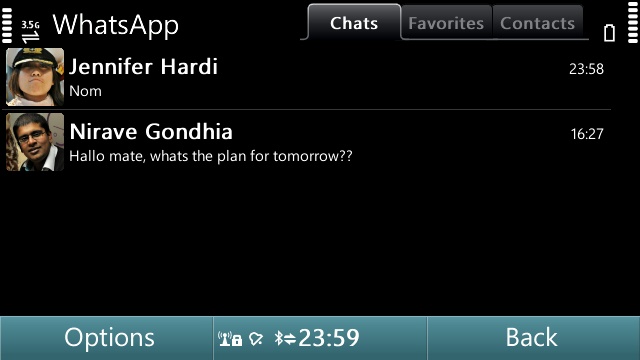
So what do I use as a SMS replacement. Normally I use direct messages via twitter, but not everyone is on twitter, particularly my friends in Asia. For those who aren't, I use WhatsApp. WhatsApp is a cheap instant messaging client not too dissimilar to RIM's BlackBerry Messenger service - only this allows for cross platform conversations. Because WhatsApp uses your data connection, it is also cheaper - particularly if you send a lot of international texts. The only issue is your friends will have to use WhatsApp as well, but this applies to all instant messaging client.

Feature wise, WhatsApp is limited to text messaging with no option for voice calling. WhatsApp's main advantage over competing instant messaging clients is it automatically scans your phone book and presents a list of contacts (including profile pictures) who are also using WhatsApp into the Favourite category. Obviously this doesn't mean you can merrily contact anyone on that list. They have to have you listed on their phone book as well before they can see you.

Starting a new chat is easy. Simply click on a contact's name and start typing in the input box. Chats are presented with a threaded view, and is far quicker than the default Nokia's Conversation application (what isn't?). You can also send images, videos, audio notes and your current location. Unfortunately I have not found a way to cancel an upload short of closing the application.

Anyway, within the chat area, you will also be able to see whether the contact is currently online, and here lies the biggest issue with WhatsApp: unlike text messages, a text can't be pushed towards the contact if he or she isn't online. Early versions of WhatsApp for Symbian has proven to be a battery hog, but I've had no batteries issues with the latest version.

Quirks aside, WhatsApp is a cheap way of getting people off an expensive text messaging plan. It is currently available for a one year free service for those on Symbian and Android, after that it only costs US$1.99 a year to subscribe to the service.

Whatsapp is available for iOS, Symbian, Android and Blackberry platforms.
WhatsApp review

WhatsApp review

Two days ago I wrote about how I paid £20 for six months of Pay As You Go mobile internet, and how I thought there are little reason in needing voice and text bundles. These days most of my communications are text based, with voice calls made mainly through Skype or a land line phone (we do need them for our broadband).

So what do I use as a SMS replacement. Normally I use direct messages via twitter, but not everyone is on twitter, particularly my friends in Asia. For those who aren't, I use WhatsApp. WhatsApp is a cheap instant messaging client not too dissimilar to RIM's BlackBerry Messenger service - only this allows for cross platform conversations. Because WhatsApp uses your data connection, it is also cheaper - particularly if you send a lot of international texts. The only issue is your friends will have to use WhatsApp as well, but this applies to all instant messaging client.

Feature wise, WhatsApp is limited to text messaging with no option for voice calling. WhatsApp's main advantage over competing instant messaging clients is it automatically scans your phone book and presents a list of contacts (including profile pictures) who are also using WhatsApp into the Favourite category. Obviously this doesn't mean you can merrily contact anyone on that list. They have to have you listed on their phone book as well before they can see you.

Starting a new chat is easy. Simply click on a contact's name and start typing in the input box. Chats are presented with a threaded view, and is far quicker than the default Nokia's Conversation application (what isn't?). You can also send images, videos, audio notes and your current location. Unfortunately I have not found a way to cancel an upload short of closing the application.

Anyway, within the chat area, you will also be able to see whether the contact is currently online, and here lies the biggest issue with WhatsApp: unlike text messages, a text can't be pushed towards the contact if he or she isn't online. Early versions of WhatsApp for Symbian has proven to be a battery hog, but I've had no batteries issues with the latest version.

Quirks aside, WhatsApp is a cheap way of getting people off an expensive text messaging plan. It is currently available for a one year free service for those on Symbian and Android, after that it only costs US$1.99 a year to subscribe to the service.

Whatsapp is available for iOS, Symbian, Android and Blackberry platforms.
Jumat, 11 Februari 2011
Nokia embrace Windows Phone

Nokia embrace Windows Phone

Nokia today announced that they will be adopting Microsoft’s Windows Phone platform as their primary smartphone strategy. In an open letter by Nokia’s CEO Stephen Elop and Microsoft’s Steve Ballmer, Nokia and Microsoft announced plans for a strategic partnership to build a new global mobile ecosystem.

This, is a good thing.

See, I am a fan of Symbian, due to the flexibility and features it brings to power users. I also happen to like Windows Phone 7 a lot. I've always maintained that Windows Phone has a bright future, not in its current state, but after a couple of updates.

Not only that, Nokia will have a degree of control over Windows Phone platform. Microsoft currently have a strict requirement on hardware and software. A LG, Samsung and HTC Windows Phone 7 looks a like and has almost nothing to differentiate between all of them. Not with Nokia. With Windows Phone, Nokia will be able to change almost anything with Windows Phone, including the UI - though the won't as this will likely break app compatibility.

I also admire Stephen Elop's attitude. It takes a lot of guts to create so much disruption when Nokia is still top of the industry. He, I believe, is the right person to lead Nokia out of the deep hole their former regime (OPK and Anssi) dug themselves into.
Nokia embrace Windows Phone

Nokia embrace Windows Phone

Nokia today announced that they will be adopting Microsoft’s Windows Phone platform as their primary smartphone strategy. In an open letter by Nokia’s CEO Stephen Elop and Microsoft’s Steve Ballmer, Nokia and Microsoft announced plans for a strategic partnership to build a new global mobile ecosystem.

This, is a good thing.

See, I am a fan of Symbian, due to the flexibility and features it brings to power users. I also happen to like Windows Phone 7 a lot. I've always maintained that Windows Phone has a bright future, not in its current state, but after a couple of updates.

Not only that, Nokia will have a degree of control over Windows Phone platform. Microsoft currently have a strict requirement on hardware and software. A LG, Samsung and HTC Windows Phone 7 looks a like and has almost nothing to differentiate between all of them. Not with Nokia. With Windows Phone, Nokia will be able to change almost anything with Windows Phone, including the UI - though the won't as this will likely break app compatibility.

I also admire Stephen Elop's attitude. It takes a lot of guts to create so much disruption when Nokia is still top of the industry. He, I believe, is the right person to lead Nokia out of the deep hole their former regime (OPK and Anssi) dug themselves into.
Rabu, 12 Januari 2011
Gravity for Symbian review

Gravity for Symbian review

Gravity is a rarity among Symbian applications. It has a UI that not only looks good, but also works great. It is fast and comes with massive loads of features. What started out as a simply Twitter client, the sole developer at Mobileways.de has implemented support for Google Reader, Foursquare, Facebook and the open source StatusNet, with varying degree of success.


Considering how backwards Symbian is supposed to be (according to American blogs anyway), and how there are virtually zero competition on the platform, the number of features on Gravity is quite a feat. The sheer number of features, it's stableness and speed, easily makes Gravity one of the best mobile social network clients on any platform. And I say that with a straight face.

At a time when Nokia is urging developers to code in 'code once, deploy everywhere' Qt, Gravity is still reassuringly native. I've nothing against Qt, but so far none of the Qt based applications I've seen has convinced me it is better than native. Gravity is compatible with S60v3 and all modern Symbian touchscreen devices from Samsung's abandoned at birth Omnia HD to Sony Ericsson's cute Vivaz and Nokia's 'flagship' N8.


Let's begin with Twitter, as this is what Gravity was designed for. Gravity has almost all the features that I could ever want from a mobile Twitter client. It supports both native and old-style retweets, geolocation tagging of tweets, follow/unfollow, direct message (with threaded UI), the creation and management of lists, uploading images to popular image sharing sites (TwitPic, Flickr etc.), alert, multiple accounts, draft and schedule posts, homescreen widget, notification (in both screensaver on Symbian^3 devices, as well as audible/vibration) and much more.

There are a couple of features I would like to see added. For example an alert when someone follows, filters and the ability to open URLs to Opera Mobile rather than Symbian's native Web browser. Speaking of URLs, you can also set Gravity to save URLs to Instapaper and other services to read it later, a useful alternative to using the favourites function to bookmark posts to read later.


The Foursquare client is as basic as it goes. It only allows check-ins and shouts (to Twitter and/or Facebook - provided you have your Foursquare account is linked to them). There are no supports for leaving and viewing tips, nor is the ability to delete previous check-ins from the history present.

The most curious absence is the lack of Specials, a Foursquare feature that allows participants to reward check-ins to users, so don't go deleting that amateurish official Foursquare Symbian client just yet. Having said that if all you want to do is check-in or shout, Gravity is perfect.


If you are a Facebook user, you will be pleased to know that Gravity supports pretty much most of the important features of Mark Zuckerberg's Friendster rip-off, including Messages (in threaded conversation view), notifications (no friend requests here), News Feed and Status Updates, including replies. It isn't a Facebook mobile client replacement, offering even less than Facebook's touchscreen mobile website. But it is indispensable if all you want is a quick glance on what your Facebook friends are up to, post a status update or reply.

A built-in RSS reader in the form of Google Reader is the next major feature of Gravity worth writing about. This is pretty basic, but at least it has all the essential functions one would normally need form a newsreader software. Like the Twitter bit of Gravity, URLs can be posted to Delicious or added to Instapaper or Read-it-Later. There is an option to easily tweet the post as well.


In an age of 99p mobile apps, Gravity isn't cheap (£8 via the Ovi Store), and that's before taking into account the amount of good freeware social network clients you can get on competing platforms like Android and iOS. But if you have a Symbian phone, and you need a powerful Twitter application then Gravity is your answer. You could do a lot worse with £8 anyway.

I also have a relatively modern Android phone (with around ten Twitter clients installed!), and my girlfriend has an iPod Touch 4G which she tethers wirelessly to her ageing Nokia none-touch smartphone, and both of us always fall back to Gravity simply because we both think it is the most effective mobile Twitter application available on any mobile platforms.
Gravity for Symbian review

Gravity for Symbian review

Gravity is a rarity among Symbian applications. It has a UI that not only looks good, but also works great. It is fast and comes with massive loads of features. What started out as a simply Twitter client, the sole developer at Mobileways.de has implemented support for Google Reader, Foursquare, Facebook and the open source StatusNet, with varying degree of success.


Considering how backwards Symbian is supposed to be (according to American blogs anyway), and how there are virtually zero competition on the platform, the number of features on Gravity is quite a feat. The sheer number of features, it's stableness and speed, easily makes Gravity one of the best mobile social network clients on any platform. And I say that with a straight face.

At a time when Nokia is urging developers to code in 'code once, deploy everywhere' Qt, Gravity is still reassuringly native. I've nothing against Qt, but so far none of the Qt based applications I've seen has convinced me it is better than native. Gravity is compatible with S60v3 and all modern Symbian touchscreen devices from Samsung's abandoned at birth Omnia HD to Sony Ericsson's cute Vivaz and Nokia's 'flagship' N8.


Let's begin with Twitter, as this is what Gravity was designed for. Gravity has almost all the features that I could ever want from a mobile Twitter client. It supports both native and old-style retweets, geolocation tagging of tweets, follow/unfollow, direct message (with threaded UI), the creation and management of lists, uploading images to popular image sharing sites (TwitPic, Flickr etc.), alert, multiple accounts, draft and schedule posts, homescreen widget, notification (in both screensaver on Symbian^3 devices, as well as audible/vibration) and much more.

There are a couple of features I would like to see added. For example an alert when someone follows, filters and the ability to open URLs to Opera Mobile rather than Symbian's native Web browser. Speaking of URLs, you can also set Gravity to save URLs to Instapaper and other services to read it later, a useful alternative to using the favourites function to bookmark posts to read later.


The Foursquare client is as basic as it goes. It only allows check-ins and shouts (to Twitter and/or Facebook - provided you have your Foursquare account is linked to them). There are no supports for leaving and viewing tips, nor is the ability to delete previous check-ins from the history present.

The most curious absence is the lack of Specials, a Foursquare feature that allows participants to reward check-ins to users, so don't go deleting that amateurish official Foursquare Symbian client just yet. Having said that if all you want to do is check-in or shout, Gravity is perfect.


If you are a Facebook user, you will be pleased to know that Gravity supports pretty much most of the important features of Mark Zuckerberg's Friendster rip-off, including Messages (in threaded conversation view), notifications (no friend requests here), News Feed and Status Updates, including replies. It isn't a Facebook mobile client replacement, offering even less than Facebook's touchscreen mobile website. But it is indispensable if all you want is a quick glance on what your Facebook friends are up to, post a status update or reply.

A built-in RSS reader in the form of Google Reader is the next major feature of Gravity worth writing about. This is pretty basic, but at least it has all the essential functions one would normally need form a newsreader software. Like the Twitter bit of Gravity, URLs can be posted to Delicious or added to Instapaper or Read-it-Later. There is an option to easily tweet the post as well.


In an age of 99p mobile apps, Gravity isn't cheap (£8 via the Ovi Store), and that's before taking into account the amount of good freeware social network clients you can get on competing platforms like Android and iOS. But if you have a Symbian phone, and you need a powerful Twitter application then Gravity is your answer. You could do a lot worse with £8 anyway.

I also have a relatively modern Android phone (with around ten Twitter clients installed!), and my girlfriend has an iPod Touch 4G which she tethers wirelessly to her ageing Nokia none-touch smartphone, and both of us always fall back to Gravity simply because we both think it is the most effective mobile Twitter application available on any mobile platforms.
Rabu, 05 Januari 2011
no image

Nokia Big Screen with Nokia N8 and Wii Remote

Nokia Beta Labs today announced the availability of Nokia Big Screen for Symbian^3 devices with HDMI-out (currently only the Nokia N8 supports this, with the E7 not due out for a couple of weeks).

Symbian^3 with HDMI-out ports already allow users to watch videos, pictures and play music on their HD telly, but the mobile orientated UI is far from suitable for media consumption. With Nokia Big Screen, the application presents the user with a UI that is designed from the ground up to take advantage of a large HD screen (up to 720p). The phone's screen will double as a remote, with a layout similar to a TV remote. But even then that isn't ideal.

In comes the Wii remote (and other Bluetooth enabled devices like keyboard). In the case of Nintendo's waggle device, just activate the Wiimote's Bluetooth pairing mode by pressing the red button at the back (or press the 1+2 buttons which I forgot...). The buttons works as they should: A for select, B for back and the Home key takes you right back to the front.

It isn't perfect though, but then this is merely a proof of concept app by their Beta Labs department. I would like to see bigger fonts, as well as support for folder/sorting support (what's with Nokia and their refusal to support folders with picture viewing apps?) and proper 720p support (images are still displayed at what I believe is VGA resolution).

no image

Nokia Big Screen with Nokia N8 and Wii Remote

Nokia Beta Labs today announced the availability of Nokia Big Screen for Symbian^3 devices with HDMI-out (currently only the Nokia N8 supports this, with the E7 not due out for a couple of weeks).

Symbian^3 with HDMI-out ports already allow users to watch videos, pictures and play music on their HD telly, but the mobile orientated UI is far from suitable for media consumption. With Nokia Big Screen, the application presents the user with a UI that is designed from the ground up to take advantage of a large HD screen (up to 720p). The phone's screen will double as a remote, with a layout similar to a TV remote. But even then that isn't ideal.

In comes the Wii remote (and other Bluetooth enabled devices like keyboard). In the case of Nintendo's waggle device, just activate the Wiimote's Bluetooth pairing mode by pressing the red button at the back (or press the 1+2 buttons which I forgot...). The buttons works as they should: A for select, B for back and the Home key takes you right back to the front.

It isn't perfect though, but then this is merely a proof of concept app by their Beta Labs department. I would like to see bigger fonts, as well as support for folder/sorting support (what's with Nokia and their refusal to support folders with picture viewing apps?) and proper 720p support (images are still displayed at what I believe is VGA resolution).

Rabu, 08 Desember 2010
Skype now compatible with Nokia N8 and other Symbian^3 devices

Skype now compatible with Nokia N8 and other Symbian^3 devices

They sure took their time, but hei, at least it is here and before Christmas too. Skype is now compatible with Symbian^3 - that means it will work on the Nokia N8, C6-01, C7 and E7 devices. As yet, I've not encountered any issues with the app but it's barely been a day. Now, give us video calling and I'll be happy.

To download and enjoy free calls on your phone, point your mobile browser to m.skype.com
Skype now compatible with Nokia N8 and other Symbian^3 devices

Skype now compatible with Nokia N8 and other Symbian^3 devices

They sure took their time, but hei, at least it is here and before Christmas too. Skype is now compatible with Symbian^3 - that means it will work on the Nokia N8, C6-01, C7 and E7 devices. As yet, I've not encountered any issues with the app but it's barely been a day. Now, give us video calling and I'll be happy.

To download and enjoy free calls on your phone, point your mobile browser to m.skype.com
Minggu, 05 Desember 2010
no image

Games for your Nokia N8

All of these games are compatible with Nokia's Symbian^3 phones (N8, C6-01, C7, E7). If some of them aren't showing on your mobile's Ovi Store, well good for you. Go buy a PSP instead.

Angry Birds by Rovio

This delightful hit iPhone game is now on Symbian^3 (as well as every gaming platform on earth). Though it costs more, has less levels (more are promised with free updates) and lacks achievements, it is still a fun puzzle game that deserves your attention. It didn't sell millions for nothing. For the uninitiated (all seven of you), Angry Birds's gameplay revolves around using a catapult to fire birds (of different abilities) at evil green pigs in their fortresses. Fun? Yes it is.

8/10

Real Football 2010 HD by Gameloft

If there ever was a game that highlights the disadvantages of touchscreen only devices for gaming, this is it. Controls are unwieldy, it's like trying to drive a Formula One car fitted with a tractor engine. Visuals are ugly, and the commentary gets annoying after the first few seconds. Even the original FIFA was better, and that was released 17 years ago. Dear developers (not you Gameloft): for goodness sake, just give me Sensible Soccer!

2/10

Hero of Sparta HD by Gameloft

Gameloft is on a roll here with bad games (is it surprising? they've been making bad games since I can remember). Sticking a HD suffix on it doesn't help. This God of War rip-off is so bad, it is probably what Kratos dreams of when he has a nightmare. Sorry, but it is shit. I don't care if it costs only £3, it is still money wasted on something that is an insult to modern gaming,

2/10

Need for Speed: Shift HD by EA

This is one of the better games on Symbian^3. The visuals are pretty good (though no where near PSP level), though I do wish for higher framerate for smoother gameplay. Unfortunately as with all touchscreen games, NFS:Shift HD (stop it with the HD suffix - it isn't HD, none of these games are!) suffers from the lack of physical keys, but it isn't too bad either. With assisted braking turned on, it is far from atrocious. Not that I would recommend playing this despiteit being free on the N8's Ovi Store.

5/10

Bounce Boing Battle by Rovio

Boune Boing Battle is a Symbian^1 game, but that shouldn't put you off. It is one of the few games that the developers has designed the game around a phone and its features rather than trying to shoehorn a traditional game into a mobile touchscreen device. It is a two player affair, so you must have a second player with another touchscreen Bluetooth phone to play with. Basically you try to bounce the ball back at them by drawing a wall on the screen for it to bounce off. Simples. It doesn't offer much else (hei it is a tech demo). But then again it is free and I've no complaints about that.

7/10
no image

Games for your Nokia N8

All of these games are compatible with Nokia's Symbian^3 phones (N8, C6-01, C7, E7). If some of them aren't showing on your mobile's Ovi Store, well good for you. Go buy a PSP instead.

Angry Birds by Rovio

This delightful hit iPhone game is now on Symbian^3 (as well as every gaming platform on earth). Though it costs more, has less levels (more are promised with free updates) and lacks achievements, it is still a fun puzzle game that deserves your attention. It didn't sell millions for nothing. For the uninitiated (all seven of you), Angry Birds's gameplay revolves around using a catapult to fire birds (of different abilities) at evil green pigs in their fortresses. Fun? Yes it is.

8/10

Real Football 2010 HD by Gameloft

If there ever was a game that highlights the disadvantages of touchscreen only devices for gaming, this is it. Controls are unwieldy, it's like trying to drive a Formula One car fitted with a tractor engine. Visuals are ugly, and the commentary gets annoying after the first few seconds. Even the original FIFA was better, and that was released 17 years ago. Dear developers (not you Gameloft): for goodness sake, just give me Sensible Soccer!

2/10

Hero of Sparta HD by Gameloft

Gameloft is on a roll here with bad games (is it surprising? they've been making bad games since I can remember). Sticking a HD suffix on it doesn't help. This God of War rip-off is so bad, it is probably what Kratos dreams of when he has a nightmare. Sorry, but it is shit. I don't care if it costs only £3, it is still money wasted on something that is an insult to modern gaming,

2/10

Need for Speed: Shift HD by EA

This is one of the better games on Symbian^3. The visuals are pretty good (though no where near PSP level), though I do wish for higher framerate for smoother gameplay. Unfortunately as with all touchscreen games, NFS:Shift HD (stop it with the HD suffix - it isn't HD, none of these games are!) suffers from the lack of physical keys, but it isn't too bad either. With assisted braking turned on, it is far from atrocious. Not that I would recommend playing this despiteit being free on the N8's Ovi Store.

5/10

Bounce Boing Battle by Rovio

Boune Boing Battle is a Symbian^1 game, but that shouldn't put you off. It is one of the few games that the developers has designed the game around a phone and its features rather than trying to shoehorn a traditional game into a mobile touchscreen device. It is a two player affair, so you must have a second player with another touchscreen Bluetooth phone to play with. Basically you try to bounce the ball back at them by drawing a wall on the screen for it to bounce off. Simples. It doesn't offer much else (hei it is a tech demo). But then again it is free and I've no complaints about that.

7/10
Selasa, 09 November 2010
Nokia N8 USB On-The-Go

Nokia N8 USB On-The-Go

The Nokia N8 features a unique feature (to Symbian at least) called USB On-The-Go. USB OTG basically allows users to plug USB devices such as flash drives and, with enough power, portable hard drives into their mobile device, in this case the N8.

What this means is that owners of the N8 have easy access to their files on other external drives without the need to use a PC. Users can also use the N8 to charge any devices that accepts USB charging, although I don't see any reason for doing so. Unfortunately the N8's USB OTG function does not seem to recognise any of my mouse (a VAIO wired and Logitech wireless).

My lovely VOIP Sony VAIO mouse isn't supported

A storage device like this thumb drive will work just fine

The N8 had no issue recognising my four year old Samsung YP-U1Q DAP

I honestly thought this would work, but the N8 refuses to play nice with the PSP :(

Similarly it threw a hissy fit when connected to a M2 card reader

Not surprising - a portable hard drive like this will need to be connected to an external power supply first
Copyright © 2012 hot gadget review and price All Right Reserved
Designed by CBTblogger